WNMU Face Milling Cutter Selection Guide for Better Surface Finish
Author : Surya makeyoueasy | Published On : 27 Aug 2026
Introduction
Choosing the right WNMU face milling cutter is essential for achieving a smooth surface finish, stable cutting, and consistent productivity in CNC machining. The correct combination of cutter diameter, WNMU insert grade, geometry, cutting parameters, and machine rigidity can reduce vibration, improve insert life, and deliver better surface quality across steel, stainless steel, cast iron, and other engineering materials.
What Is a WNMU Face Milling Cutter?
A WNMU face milling cutter is an indexable milling tool that uses WNMU-type carbide inserts for machining flat workpiece surfaces.
The cutter body holds multiple inserts around its circumference, allowing several cutting edges to remove material during each revolution.
WNMU milling systems can be used for:
-
Face milling
-
Rough machining
-
Semi-finishing
-
General milling
-
High-productivity machining
-
Large surface machining
The exact capabilities depend on the cutter body, insert geometry, and manufacturer’s specifications.
Why Use WNMU Inserts for Face Milling?
WNMU inserts are designed to provide multiple usable cutting edges in compatible milling cutters, which can make them economical for production machining.
Depending on the specific WNMU cutter system, key advantages can include:
-
Multiple cutting edges
-
Good edge strength
-
High material removal capability
-
Stable cutting performance
-
Cost-effective insert utilization
-
Suitable roughing and semi-finishing performance
-
Consistent surface quality
For the best results, the insert and cutter should always be treated as a complete machining system.
How to Choose a WNMU Face Milling Cutter
1. Select the Right Cutter Diameter
Cutter diameter should be chosen according to the width of the workpiece, machine power, spindle capacity, and required machining strategy.
Common face mill diameters may include:
-
40 mm
-
50 mm
-
63 mm
-
80 mm
-
100 mm
-
125 mm
Available sizes depend on the specific WNMU cutter series.
A properly selected diameter can reduce unnecessary passes while maintaining stable cutting conditions.
2. Match the Insert to the Workpiece Material
The WNMU insert grade should match the material being machined.
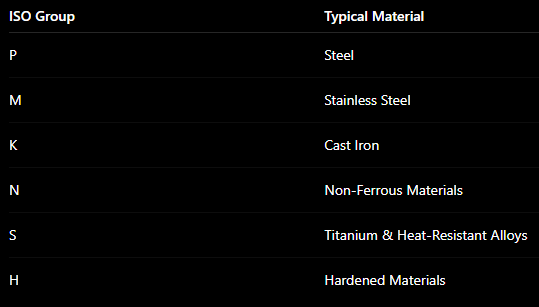
Using the wrong carbide grade can lead to rapid wear, chipping, poor surface finish, or reduced productivity.
3. Choose the Correct Insert Geometry
Insert geometry influences:
-
Cutting forces
-
Chip formation
-
Edge strength
-
Surface finish
-
Tool life
A sharper geometry can help reduce cutting forces, while a stronger cutting edge may perform better during roughing and demanding cutting conditions.
For better surface finish, select a geometry specifically recommended for finishing or general-purpose face milling.
4. Check Cutter Pitch
The number and spacing of inserts on a cutter affect machining performance.
Fine-Pitch Cutters
More cutting edges can increase feed capability and productivity when machine power and chip evacuation are suitable.
Coarse-Pitch Cutters
Fewer inserts provide more space for chip evacuation and can be useful in certain roughing or unstable machining conditions.
Choose cutter pitch based on machine power, workpiece material, chip formation, and machining stability.
5. Select the Right Insert Grade and Coating
Carbide grade and coating play a major role in WNMU insert life.
The correct combination can improve:
-
Wear resistance
-
Heat resistance
-
Edge stability
-
Cutting speed capability
-
Tool life
For example, the ideal grade for steel may differ significantly from one intended for stainless steel or cast iron.
Always follow the insert manufacturer’s material and cutting-data recommendations.
How to Get a Better Surface Finish with WNMU Cutters
Choosing the cutter is only half the puzzle. 🧩 The machining setup also matters.
Maintain Low Cutter Runout
Excessive runout causes some inserts to remove more material than others, leading to uneven wear and visible surface marks.
Check the cutter, arbor, inserts, and spindle when surface finish becomes inconsistent.
Use the Correct Feed Rate
An excessively high feed can produce rough surfaces, while an unnecessarily low feed may reduce productivity and cause undesirable cutting conditions.
Use a feed rate appropriate for the insert geometry and material.
Optimize Cutting Speed
Correct cutting speed helps maintain stable cutting and insert life.
Too much speed can accelerate wear, while unsuitable low speeds can contribute to poor cutting performance in some materials.
Use a Suitable Depth of Cut
Match the axial depth of cut to the WNMU insert and cutter specifications.
Avoid exceeding the recommended cutting range.
Machine Rigidity Matters
Even a premium WNMU face milling cutter cannot deliver its full potential in an unstable setup.
For better results:
-
Use a rigid tool holder.
-
Minimize unnecessary tool overhang.
-
Clamp the workpiece securely.
-
Keep the cutter and holder interfaces clean.
-
Check spindle condition.
-
Ensure inserts are properly seated.
Reducing vibration can significantly improve both surface finish and insert life.
WNMU Face Milling Cutter Applications
WNMU milling cutters can be used across many CNC manufacturing applications, including:
-
Automotive components
-
Machine components
-
General engineering
-
Die and mold manufacturing
-
Industrial equipment
-
CNC job shops
-
Production machining
-
Large flat workpieces
-
Steel component machining
-
Cast iron machining
The appropriate insert grade and cutting parameters should be selected for each application.
Common WNMU Face Milling Problems
Poor Surface Finish
Check insert wear, cutter runout, feed rate, machine stability, and workpiece clamping.
Insert Chipping
Review the carbide grade, cutting parameters, machining stability, and interrupted cutting conditions.
Excessive Vibration
Reduce tool overhang and check the rigidity of the cutter, holder, spindle, and workpiece.
Uneven Insert Wear
Inspect insert seating, cutter runout, pocket condition, and spindle alignment.
Short Insert Life
Check whether the insert grade, coating, speed, feed, and depth of cut are suitable for the workpiece material.
Tips to Increase WNMU Insert Life
For reliable and productive machining:
-
Match the insert grade to the material.
-
Use recommended cutting parameters.
-
Keep insert pockets clean.
-
Check cutter runout regularly.
-
Maintain rigid workholding.
-
Avoid excessive tool overhang.
-
Index inserts before severe wear occurs.
-
Replace damaged insert screws when necessary.
-
Use appropriate coolant or dry-machining conditions for the application.
WNMU Cutter Buying Checklist
Before purchasing a WNMU face milling cutter, check:
Cutter Diameter: Match it to the workpiece and machine capacity.
Insert Compatibility: Confirm the exact WNMU insert designation required by the cutter.
Number of Teeth: Choose according to productivity, machine power, and chip evacuation.
Workpiece Material: Select the appropriate carbide grade and geometry.
Arbor Connection: Verify the mounting dimensions and holder compatibility.
Machining Operation: Determine whether the cutter is intended for roughing, semi-finishing, finishing, or general-purpose milling.
Surface Finish Requirement: Select the insert geometry and cutting conditions accordingly.
Why Choose MakeYouEasy?
At MakeYouEasy, you can explore CNC cutting tools and industrial tooling solutions for professional machining applications.
The product range includes:
-
WNMU Face Milling Cutters
-
WNMU Milling Inserts
-
Face Milling Cutters
-
High-Feed Milling Cutters
-
Milling Inserts
-
U Drills
-
Turning Inserts
-
Grooving Inserts
-
Thread Milling Cutters
-
BT Tool Holders
Conclusion
Selecting the right WNMU face milling cutter for better surface finish requires careful consideration of the cutter diameter, insert grade, geometry, cutter pitch, workpiece material, and machining conditions. Proper cutter runout, rigid workholding, suitable speeds and feeds, and correct insert seating are equally important for achieving consistent results.
Instead of choosing a cutter based solely on diameter or price, select the complete cutter-and-insert combination that matches your CNC machine and application. The right setup can deliver smoother surfaces, longer insert life, stable machining, and lower cost per component.
Frequently Asked Questions
1. What is a WNMU face milling cutter used for?
A WNMU face milling cutter is used for the productive machining of flat surfaces in CNC milling applications.
2. How can I improve surface finish with a WNMU cutter?
Use the correct insert geometry, cutting parameters, low runout, and a rigid machining setup.
3. Which WNMU insert is best for steel?
Choose a WNMU insert grade specifically recommended for ISO P steel and your cutting conditions.
4. Why do WNMU inserts wear unevenly?
Uneven wear can result from cutter runout, incorrect insert seating, damaged pockets, or unstable machining conditions.
5. How do I choose the right WNMU cutter diameter?
Select the diameter based on workpiece width, machine capacity, spindle power, and required machining strategy.
